How to Withdraw Bitcoin to Cash in Africa Using Blink and Mavapay Money (2026 Guide)
Learn how to convert Bitcoin to Naira, Shillings, or Rands using Blink and Mavapay Money. Step-by-step off-ramp guide for Nigeria, Kenya, and South Africa.
March 22, 2026
Author
Destiny Smart
Follow us
If you hold Bitcoin on Blink wallet and want it sitting in a Nigerian, Kenyan, or South African bank account, this is the guide that actually walks you through it, not the theory, but the real flow, step by step, based on what the app actually does.
What Is Mavapay Money?
Mavapay Money is a Bitcoin off-ramp app built for Africa. It lets you receive Bitcoin over the Lightning Network and get the equivalent value deposited directly into a local bank account in Nigeria, Kenya, or South Africa.
It runs on the Bitcoin Lightning Network, which means the Bitcoin leg of every transaction settles in seconds. The app gives you two wallets: a BTC wallet for receiving sats and a USD wallet for dollar-denominated transfers. Every incoming Bitcoin transaction shows you the local currency equivalent in real time.
Receive Bitcoin from any Lightning wallet directly into your Mavapay BTC wallet
See the Naira, Shilling, or Rand equivalent of your balance live
Send value directly to any local bank account
Buy Bitcoin using local currency
Transfer USD to third-party bank accounts or other Mavapay users
How Blink and Mavapay Are Connected
The connection here goes back to the people who built these platforms.
Mavapay's founder, Theophilus Isah, previously helped build the Blink API at Galoy, the open-source company behind Blink. He knew firsthand how powerful it was. When he founded Mavapay, he chose to build his business on it. That is why Mavapay runs on Blink's Lightning infrastructure and why the mavapay-client repository exists inside Blink's GitHub organization.
For now, using Blink and Mavapay together already covers the full corridor:
Blink handles the Bitcoin side: your Lightning wallet, payments, and Stablesats for USD stability
Mavapay handles the fiat side: currency conversion, local bank payouts, and lightning bank addresses linked directly to real bank accounts
How to Withdraw Bitcoin to Cash: Step-by-Step
This is the core of what most people reading this need. Here is the exact process to move Bitcoin from Blink and receive local currency through Mavapay.
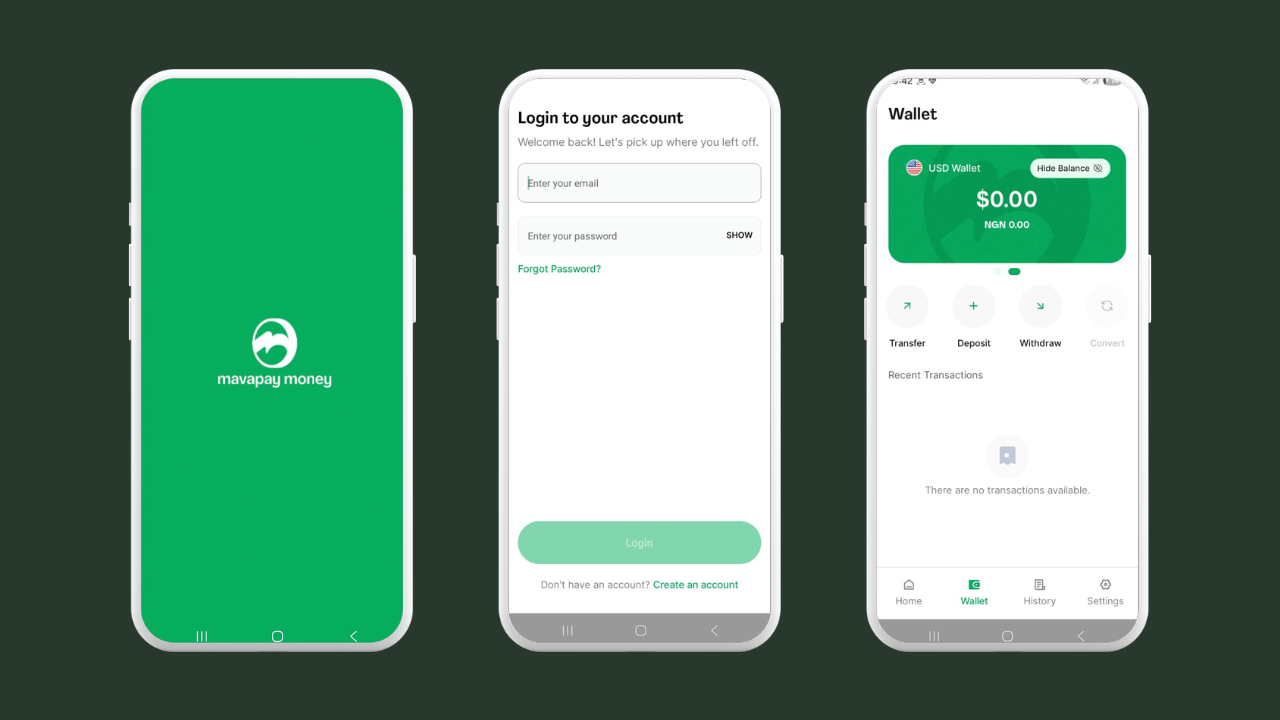
Nigerian users need their BVN to complete KYC. Other supported countries use standard government ID verification.
Once verified, link your bank account inside the app settings. This is what activates your Mavapay Lightning Address/Lightning Bank address.
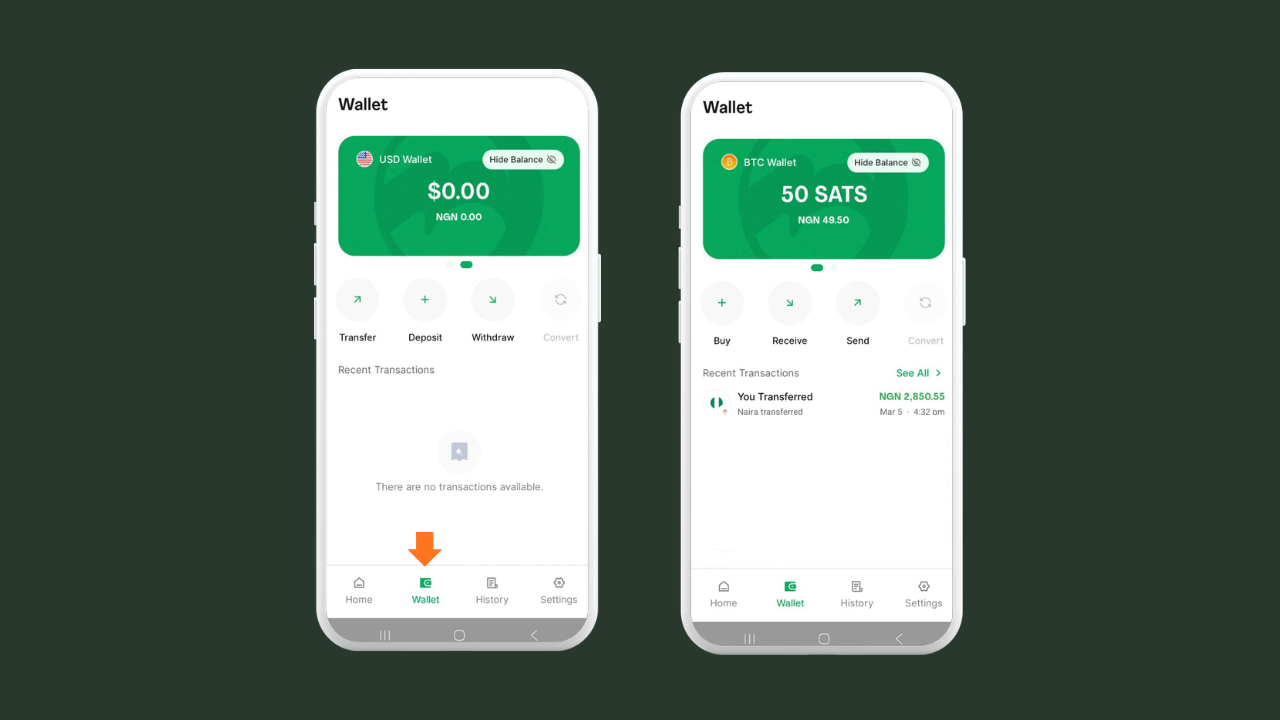
Step 2: Open Your Mavapay Wallet
Go to the Wallet tab.
This is where incoming Lightning payments land.
You will see your balance in sats with the local currency equivalent displayed underneath.
Step 3: Choose How You Want to Receive
Mavapay gives you one option:
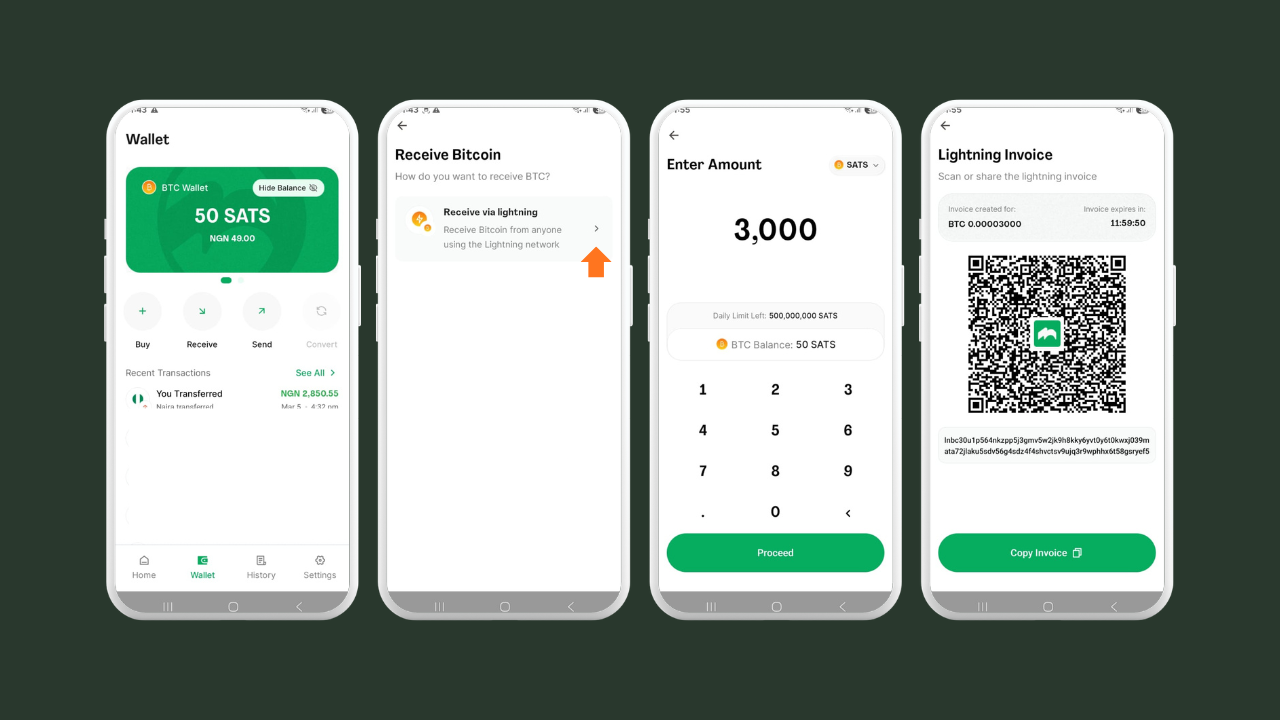
Tap Receive on your BTC wallet
Select “Receive via Lightning”
Enter amount
Click “Proceed” to generate an invoice
Using this method the sats settles inside your Mavapay BTC wallet, not your bank. You will need to manually send it to your bank afterward.
Your Mavapay Lightning Address
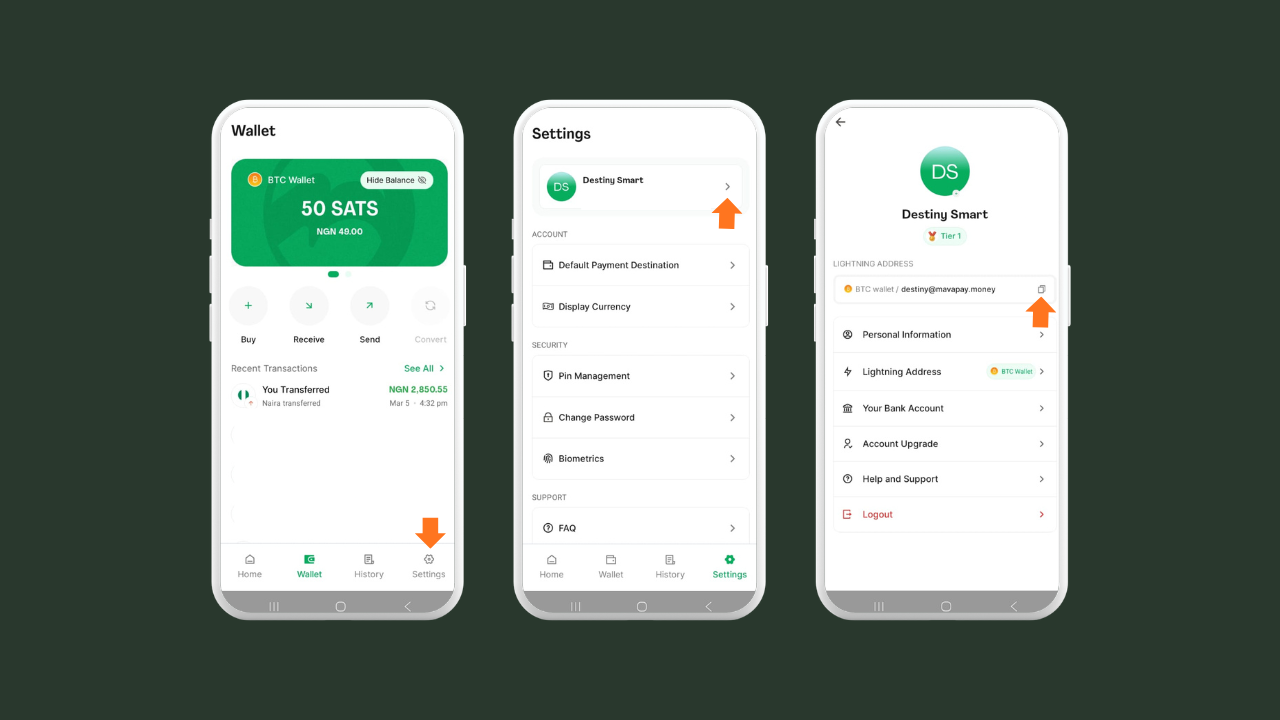
Alternatively, your lightning bank address (username@mavapay.money) lives in your profile, not the Receive flow. To get yours:
Go to Settings,
Tap your name and email at the top
And you will see it displayed there tied to your BTC wallet
Copy it and share it with whoever is paying you.
When they send to it from Blink or any Lightning-compatible wallet, the funds convert and land directly in your linked bank account automatically.
Step 4: Send From Blink Wallet
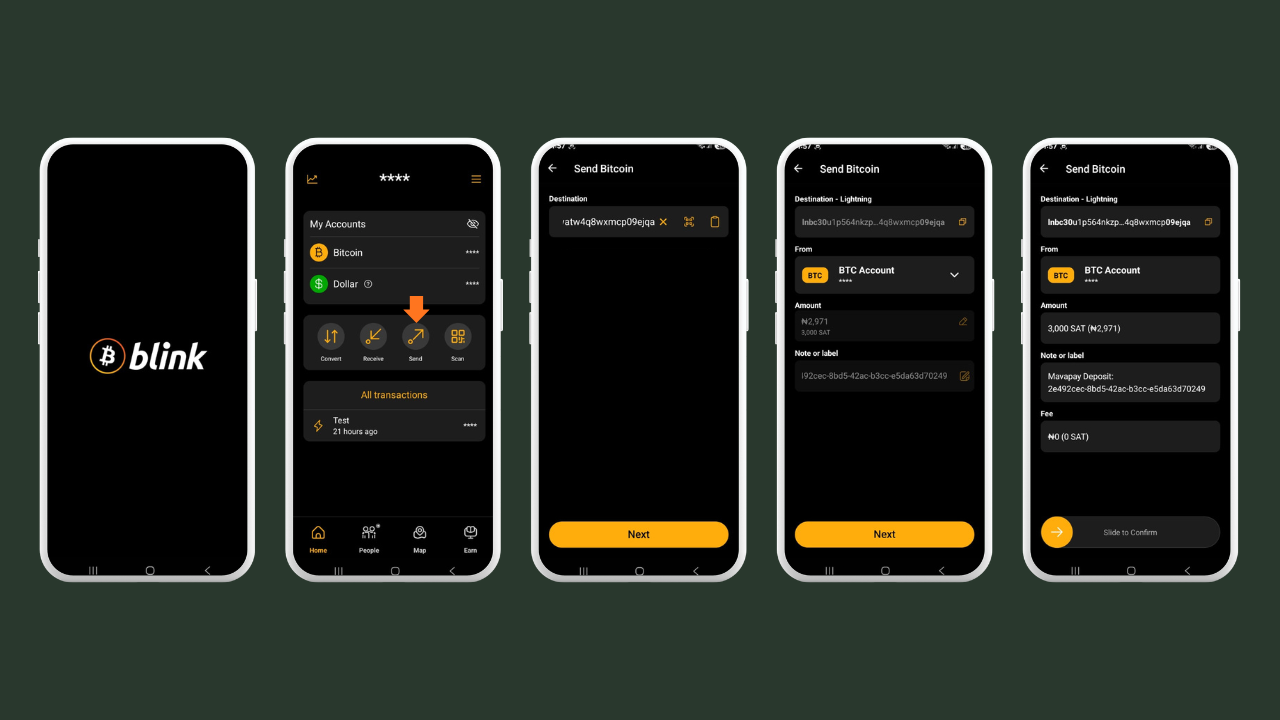
Open Blink Wallet and tap Send.
Paste your Lightning Bank address or scan the invoice QR code.
Enter the amount, review the transaction
Slide to confirm.
Settles in seconds.
Step 5: What Happens Next Depends on Which Option You Used
If you used your Mavapay Lightning Address, you are done. The sats convert automatically and go straight to your linked bank account. You will get a notification confirming it.
If you used a Lightning invoice, the sats land in your Mavapay BTC wallet. You will see the balance update with the local currency equivalent.
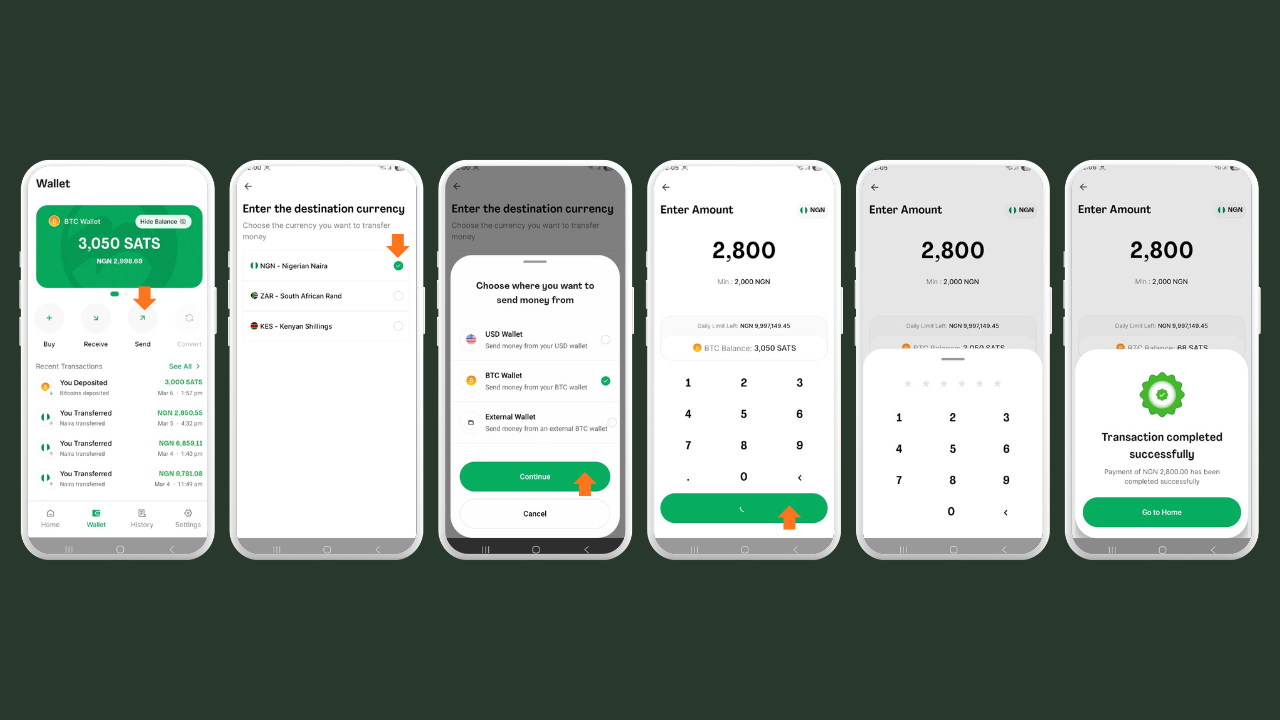
Tap Send
Click “Third Party Bank Account”
Choose your destination currency (NGN, ZAR, or KES)
Then Select BTC Wallet
Enter recipient bank details
Hit Proceed
Enter amount
Review transaction
Enter transaction pin
Step 6: Payout
Payout arrives in your bank account within minutes, depending on your country and banking partner.
The Lightning transfer from Blink wallet is always instant. Any wait time is on the local banking side, not Bitcoin's.
Supported Countries and Currencies
Mavapay currently supports payouts in three markets:
Nigeria — Naira (NGN) — Local bank transfer
Kenya — Shilling (KES) — Bank transfer
South Africa — Rand (ZAR) — Bank transfer
More markets are expected as Mavapay grows its local banking partnerships. The Lightning infrastructure is already in place, so expansion is a fiat rails problem, not a Bitcoin one.
Why Bitcoin Off-Ramps Matter in Africa
Sending money to Africa through traditional channels costs more than almost anywhere else in the world. The World Bank consistently puts Sub-Saharan Africa as the most expensive remittance corridor globally, with average fees above 8 percent before you factor in exchange rate margins and multi-day settlement windows.
Bitcoin on the Lightning Network removes that infrastructure cost. Using Blink and Mavapay together makes the full journey from international Bitcoin payment to local bank deposit faster and cheaper than anything traditional remittance offers today.
That said, Mavapay is a top-down solution. You receive Bitcoin and convert it back into the local fiat system. That is useful for where most of Africa is today. But it is a different direction from what Bitcoin Circular Economies are building, communities where the goal is to never need to off-ramp because Bitcoin is already the economy. Mavapay is a bridge for today. BCE is where we are going.
This matters for:
Freelancers getting paid internationally in Bitcoin
Businesses accepting Bitcoin and covering local expenses
Families receiving remittances from the diaspora
Communities in transition toward full circular economies
Get Started
Download Blink: iOS, Android, Huawei App Gallery or APK via GitHub
Mavapay Money works with third-party licensed partners to handle local exchange and remittance. Rates change. Check the app before you transact.
Frequently Asked Questions
Can I send from any Lightning wallet to Mavapay or only Blink? Mavapay accepts any Lightning payment. You can send from Blink, Phoenix, Muun, or any Lightning-compatible wallet using the Lightning Bank address or a Lightning invoice. Blink works particularly well with Mavapay because Mavapay is built on the Blink API.
What is a Lightning Bank address? It is a unique address automatically generated for your Mavapay account when you complete KYC and link your bank account. It looks like “yourname@mavapay.money”. What makes it different from a regular Lightning Address is that it is linked directly to your bank account, so incoming payments convert and deposit automatically with nothing extra to do on your end.
What is the difference between using the Lightning Bank address and a Lightning invoice? The Lightning Bank address sends funds straight to your bank account automatically. A Lightning invoice settles inside your Mavapay BTC wallet and requires you to manually initiate the bank transfer afterward. Use the address for regular receiving, use the invoice for a specific one-time amount.
Does the money go to my bank automatically? Only if the sender uses your Lightning Bank address. If they pay a Lightning invoice instead, the sats land in your Mavapay BTC wallet, and you need to send it to your bank manually from the app.
How long does the bank payout take? The Lightning transfer from Blink is instant. The local bank payout typically takes minutes to a few hours, depending on your country and banking partner.
What fees does Mavapay charge? Mavapay applies a conversion rate when funds are sent to a local bank account. Check the current rates inside the app before transacting, as they move with the market.
Is Mavapay safe to use? Mavapay requires identity verification to comply with financial regulations in its supported markets. It is backed by established crypto investors and built on the Blink API, the same Lightning infrastructure that powers some of the most active Bitcoin circular economies in the world.
What is a Lightning Address? A Lightning Address lets you receive Bitcoin using a format that looks like an email address, for example, “yourname@mavapay.money”. Anyone can send to it from any Lightning-compatible wallet, including Blink. Learn more at lightning.network.
Is Mavapay built on the Blink API? Yes. Mavapay's CEO previously helped build the Blink API at Galoy. When he founded Mavapay, he chose to build on it because he knew firsthand what it could do. Blink is also working toward a native integration that will make the experience even smoother directly inside the Blink app.